
Checkout Tools Compared: ThriveCart, SamCart and PayKickstart
Disclosure: DCCommunity is reader-supported. Some links on this site may be affiliate links, which means we may earn a commission at no extra cost to you. This never changes how we describe a product. Learn more.
Checkout tools handle the moment a visitor becomes a customer. They provide the payment page, connect to a payment processor and can show extra offers before and after the purchase. If you already have a website or a landing page, a checkout tool may be all you need to start selling.
This guide compares three dedicated checkout tools, ThriveCart, SamCart and PayKickstart, and explains when an all-in-one platform makes more sense. Plans and features were checked on each official website in October 2026. Two of the three vendors did not show plan prices in the page content we could read, and we say so where it applies.
Checkout tools: quick comparison
| Tool | Plans | Trial | Price | Fees stated |
|---|---|---|---|---|
| ThriveCart | Standard, Pro+, Enterprise; lifetime option | 30-day free trial | See official site | 0% fees on sales |
| SamCart | Core, Pro, Custom | 7-day free trial | $79/month (Core); $59.25 billed annually | 2.9% + 30 cents with SamPay |
| PayKickstart | Three tiers by monthly revenue | 14-day free trial | See official site | 0.5% to 0.9% on revenue above the plan limit |
Where checkout tools fit in a sale
A sale online usually has five steps. The sales page explains the offer. The checkout page collects the payment. An order bump is an optional add-on the buyer can tick before paying. A one-click upsell is a second offer shown right after the payment, which the buyer can accept without typing card details again. Finally, the buyer receives a receipt and access to the product.
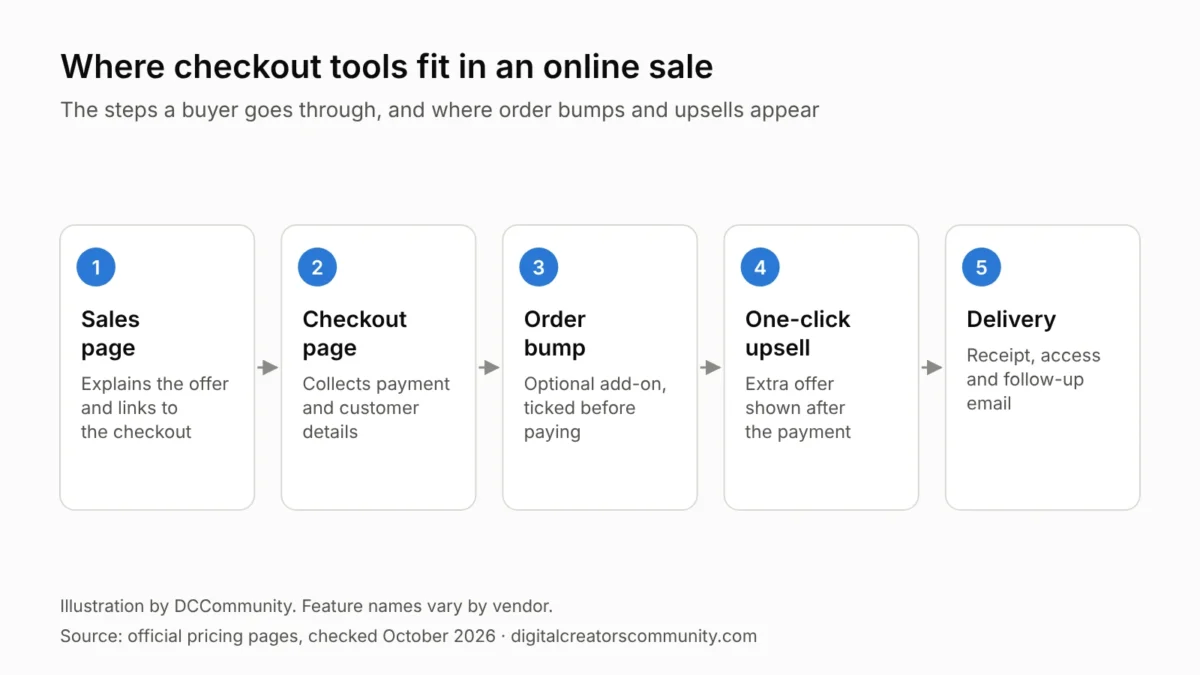
Order bumps and upsells are the main reason people pay for a dedicated tool instead of a plain payment button. Use them carefully: every extra offer should be clear about what it is and what it costs, with no pre-ticked boxes.
The three checkout tools in detail
ThriveCart
ThriveCart describes itself as a platform to sell online products, physical products, courses and subscriptions. Plans are Standard, Pro+ and Enterprise, with monthly or annual billing, a 30-day free trial and a lifetime option. The site states 0% fees on sales. Listed features include customizable checkout pages, a bump offer, one-click upsells and downsells, A/B split testing, abandoned cart recovery, sales tax automation, an affiliate center with automated payouts and a learning platform with unlimited courses and students.
- Good fit if: you want upsells, affiliates and course delivery from one checkout account.
- Keep in mind: we could not read plan prices in the page content, so confirm current pricing on the official site.
SamCart
SamCart offers two self-serve plans. Core is $79 per month, or $59.25 billed annually, and includes unlimited pages, products and checkouts, a courses app with a members area, cart abandonment recovery and one team seat. Pro is $199 per month, or $149.25 billed annually, and adds one-click upsells and order bumps, A/B testing, an affiliate center and 10 team seats. SamCart lists a 7-day free trial and a processing rate of 2.9% plus 30 cents with its own payment option.
- Good fit if: you want a polished checkout with templates and a simple monthly plan.
- Keep in mind: order bumps and one-click upsells are listed on Pro, not on Core.
PayKickstart
PayKickstart is aimed at subscription and software businesses as well as digital products. Its three tiers are defined by monthly revenue: up to $10,000, up to $50,000 and up to $200,000, with a fee of 0.9%, 0.7% or 0.5% on revenue above the limit. All tiers list one-time and subscription billing, free and paid trials, one-click upsells, customizable checkout pages and dunning management. The two higher tiers add an affiliate management center and a cancellation saver. A 14-day free trial is mentioned for all plans.
- Good fit if: you sell subscriptions and want tools to recover failed payments and reduce cancellations.
- Keep in mind: plan prices were not shown in the page content we could read, so check the official site.
What to compare across checkout tools
| Feature | ThriveCart | SamCart | PayKickstart |
|---|---|---|---|
| Order bumps | 1 on Standard, more on Pro+ | Pro plan | See official site |
| One-click upsells | Listed | Pro plan | All tiers |
| Subscriptions | Listed | Listed, with a subscription saver on Pro | All tiers |
| Affiliate program | Affiliate center with automated payouts | Pro plan | Two higher tiers |
| Course delivery | Learning platform included | Courses app on Core | Not listed |
The table shows where each vendor places a feature, based on its own pricing page. The same feature can sit on different plans, so read the plan details before you compare checkout tools on price alone.
Using order bumps and upsells fairly
Extra offers can raise the value of each order, and they can also annoy buyers if they are unclear. Keep every add-on optional and unticked by default. Show the price next to the offer. Say plainly whether a charge is one-time or recurring, and make it easy to decline. Clear checkout pages lead to fewer refund requests and fewer payment disputes.
When an all-in-one platform is enough
Several platforms include a checkout as part of a wider package. Systeme.io, Kartra and ClickFunnels® all let you take payments inside a funnel, and course tools such as Teachable have their own checkout. If you use one of them already, you may not need a separate tool. See our comparisons of sales funnel builders and online course platforms.
A dedicated checkout tool makes more sense when your site lives somewhere else, such as WordPress, and you want upsells, subscriptions or an affiliate program without moving everything.
How to choose between checkout tools
- List the offers you need. One product with one price needs far less than a subscription with upsells.
- Check which plan has upsells. Some vendors keep them for higher tiers.
- Add up every fee. Include the plan, the payment processor and any platform percentage.
- Think about sales tax. If you sell in several regions, look for tax handling.
- Test the buyer’s view. Go through your own checkout on a phone before you launch.
A short test plan before you launch
- Place a test order for a small amount, then refund it.
- Check the receipt email, the access email and the thank-you page.
- Decline the order bump and the upsell once, and accept them once, to see both paths.
- Open the checkout on a phone and on a slow connection.
- Confirm where a buyer goes to cancel a subscription or ask for a refund.
Many checkout tools include a test mode for this. If yours does, use it before you send traffic to the page, and repeat the test after any change to prices or offers.
Common mistakes when choosing checkout tools
- Buying for features you will not switch on. A/B testing and affiliate centers are useful later, not on day one.
- Missing the plan where upsells live. With some checkout tools, order bumps and one-click upsells are reserved for a higher plan.
- Forgetting payment processing. The checkout tool’s price and the processor’s fee are two separate costs.
- Not placing a test order. Buy your own product once, on a phone, and check the receipt and the access email.
How we researched this guide
We checked each company’s official website for its current focus, plan names, free option and entry price. We describe what each vendor says its product does and add practical notes on who it may suit. We have not tested these tools hands-on, and companies cannot pay to be included. See our review methodology.
Frequently asked questions
What are checkout tools?
They are services that provide the payment page for your product and connect it to a payment processor, often with extras such as order bumps, upsells and subscriptions.
What is the difference between an order bump and an upsell?
An order bump is an optional add-on offered on the checkout page before payment. An upsell is a separate offer shown after the payment is complete.
Do checkout tools replace Stripe or PayPal?
Usually not. Most checkout tools connect to a payment processor that moves the money, and some also offer their own payment option.
Do I need a checkout tool to sell one ebook?
Not always. A simple payment link or the checkout built into your course or funnel platform can be enough for a single product.
The bottom line on checkout tools
If your site already lives on WordPress or another builder, dedicated checkout tools add payments, upsells and subscriptions without moving your pages. SamCart publishes simple monthly plans. ThriveCart bundles affiliates and course delivery, and PayKickstart leans toward subscription businesses. Start from the offers you need to sell, confirm current prices on each official site and test the buyer’s path before you launch.
Related guides: sales funnel builders compared and ClickFunnels® vs Systeme.io.
Editorial note: Product names and trademarks belong to their respective owners. DCCommunity is not affiliated with or endorsed by the companies mentioned unless stated. Information was checked against official websites in October 2026 and is provided for general guidance only. Features and prices may change.